Running Streams Applications
You can run Java applications that use the Kafka Streams library without any additional configuration or requirements. Kafka Streams also provides the ability to receive notification of the various states of the application. The ability to monitor the runtime status is discussed in the monitoring guide.
Starting a Kafka Streams application
You can package your Java application as a fat JAR file and then start the application like this:
# Start the application in class `com.example.MyStreamsApp`
# from the fat JAR named `path-to-app-fatjar.jar`.
$ java -cp path-to-app-fatjar.jar com.example.MyStreamsApp
When you start your application you are launching a Kafka Streams instance of your application. You can run multiple instances of your application. A common scenario is that there are multiple instances of your application running in parallel. For more information, see Parallelism Model.
When the application instance starts running, the defined processor topology will be initialized as one or more stream tasks. If the processor topology defines any state stores, these are also constructed during the initialization period. For more information, see the State restoration during workload rebalance section).
Listeners and callbacks
KafkaStreams provides several listeners and callbacks that let you observe the internal state and behavior of your application. All listeners must be set before calling start(). Attempting to set a listener after start() has been called will throw an IllegalStateException. A setter may be called multiple times before start(). Only the most recent listener takes effect.
State listener
You can set a KafkaStreams.StateListener to be notified whenever the KafkaStreams instance transitions between states. The possible states are: CREATED, REBALANCING, RUNNING, PENDING_SHUTDOWN, NOT_RUNNING, PENDING_ERROR, and ERROR. See the KafkaStreams.State javadocs for the meaning of each state and the allowed transitions.
KafkaStreams streams = new KafkaStreams(topology, props);

streams.setStateListener((newState, oldState) -> {
    if (newState == KafkaStreams.State.RUNNING) {
        // application is now ready to process records
    } else if (newState == KafkaStreams.State.ERROR) {
        // application has encountered a fatal error
    }
});

streams.start();
Uncaught exception handler
You can set a StreamsUncaughtExceptionHandler to handle unexpected exceptions thrown by internal stream threads. The handler receives the exception and must return a StreamThreadExceptionResponse indicating how to proceed:
REPLACE_THREAD-- Replace the failed thread with a new one.SHUTDOWN_CLIENT-- Shut down thisKafkaStreamsclient.SHUTDOWN_APPLICATION-- Request all instances of the application to shut down. This is best-effort: the signal is propagated via the rebalance protocol, so there is no guarantee that other instances will receive or act on it (for example, if they are unreachable).
Example:
import org.apache.kafka.streams.errors.StreamsUncaughtExceptionHandler;

streams.setUncaughtExceptionHandler(exception -> {
    if (exception instanceof RetriableException) {
        return StreamsUncaughtExceptionHandler.StreamThreadExceptionResponse.REPLACE_THREAD;
    }
    return StreamsUncaughtExceptionHandler.StreamThreadExceptionResponse.SHUTDOWN_CLIENT;
});
The handler executes on the thread that produced the exception. Because the handler is shared across all stream threads, the implementation must be thread-safe. To get the thread that threw the exception, call Thread.currentThread() from within the handler.
State restore listener
You can set a StateRestoreListener to be notified about the progress of state store restoration. This is useful for monitoring and logging the restoration process. The listener provides callbacks for the following lifecycle events:
onRestoreStart-- Called when restoration begins for a state store partition, providing the starting and ending offsets.onBatchRestored-- Called after each batch of records is restored, providing the batch end offset and the number of records restored in the batch.onRestoreEnd-- Called when restoration completes for a state store partition, providing the total number of records restored.onRestoreSuspended-- Called when restoration is suspended because the task was migrated to another instance.
Example:
import org.apache.kafka.streams.processor.StateRestoreListener;

streams.setGlobalStateRestoreListener(new StateRestoreListener() {
    @Override
    public void onRestoreStart(TopicPartition topicPartition, String storeName,
                               long startingOffset, long endingOffset) {
        // log that restoration has started
    }

    @Override
    public void onBatchRestored(TopicPartition topicPartition, String storeName,
                                long batchEndOffset, long numRestored) {
        // track progress
    }

    @Override
    public void onRestoreEnd(TopicPartition topicPartition, String storeName,
                             long totalRestored) {
        // log that restoration is complete
    }
});
Because the listener is shared across all StreamThread instances, the implementation must be thread-safe. Note that this listener does not monitor standby task updates. To monitor standby tasks, use the standby update listener described below.
Standby update listener
You can set a StandbyUpdateListener to be notified about updates to standby state store replicas. Standby replicas keep a copy of the state store on a different instance for faster failover. The listener provides callbacks for the following lifecycle events:
onUpdateStart-- Called when a standby task begins consuming from the changelog, providing the starting offset.onBatchLoaded-- Called after each batch of records is loaded into the standby store, providing the batch end offset, batch size, and the current end offset of the changelog partition.onUpdateSuspended-- Called when the standby task stops updating. TheSuspendReasonparameter indicates why:MIGRATEDmeans the task was moved to another instance, whilePROMOTEDmeans the standby was promoted to an active task (in which case the correspondingStateRestoreListener.onRestoreStartwill be called next).
Example:
import org.apache.kafka.streams.processor.StandbyUpdateListener;

streams.setStandbyUpdateListener(new StandbyUpdateListener() {
    @Override
    public void onUpdateStart(TopicPartition topicPartition, String storeName,
                              long startingOffset) {
        // log that standby update has started
    }

    @Override
    public void onBatchLoaded(TopicPartition topicPartition, String storeName,
                              TaskId taskId, long batchEndOffset,
                              long batchSize, long currentEndOffset) {
        // track standby replication progress
    }

    @Override
    public void onUpdateSuspended(TopicPartition topicPartition, String storeName,
                                  long storeOffset, long currentEndOffset,
                                  StandbyUpdateListener.SuspendReason reason) {
        // log reason for suspension
    }
});
For more information about standby replicas, see Standby Replicas.
Elastic scaling of your application
Kafka Streams makes your stream processing applications elastic and scalable. You can add and remove processing capacity dynamically during application runtime without any downtime or data loss. This makes your applications resilient in the face of failures and for allows you to perform maintenance as needed (e.g. rolling upgrades).
For more information about this elasticity, see the Parallelism Model section. Kafka Streams leverages the Kafka group management functionality, which is built right into the Kafka wire protocol. It is the foundation that enables the elasticity of Kafka Streams applications: members of a group coordinate and collaborate jointly on the consumption and processing of data in Kafka. Additionally, Kafka Streams provides stateful processing and allows for fault-tolerant state in environments where application instances may come and go at any time.
Adding capacity to your application
If you need more processing capacity for your stream processing application, you can simply start another instance of your stream processing application, e.g. on another machine, in order to scale out. The instances of your application will become aware of each other and automatically begin to share the processing work. More specifically, what will be handed over from the existing instances to the new instances is (some of) the stream tasks that have been run by the existing instances. Moving stream tasks from one instance to another results in moving the processing work plus any internal state of these stream tasks (the state of a stream task will be re-created in the target instance by restoring the state from its corresponding changelog topic).
The various instances of your application each run in their own JVM process, which means that each instance can leverage all the processing capacity that is available to their respective JVM process (minus the capacity that any non-Kafka-Streams part of your application may be using). This explains why running additional instances will grant your application additional processing capacity. The exact capacity you will be adding by running a new instance depends of course on the environment in which the new instance runs: available CPU cores, available main memory and Java heap space, local storage, network bandwidth, and so on. Similarly, if you stop any of the running instances of your application, then you are removing and freeing up the respective processing capacity.
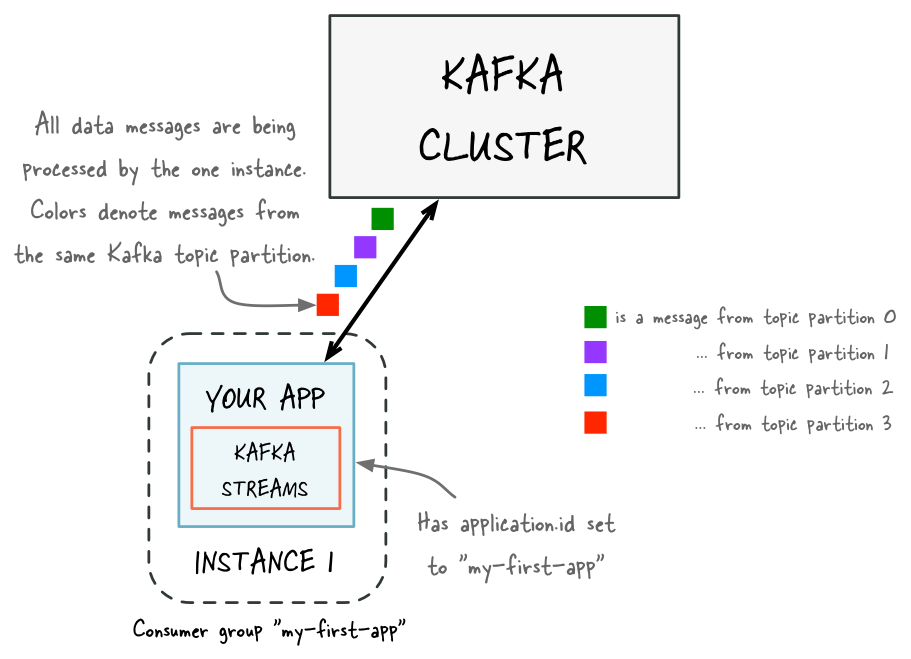
Before adding capacity: only a single instance of your Kafka Streams application is running. At this point the corresponding Kafka consumer group of your application contains only a single member (this instance). All data is being read and processed by this single instance.
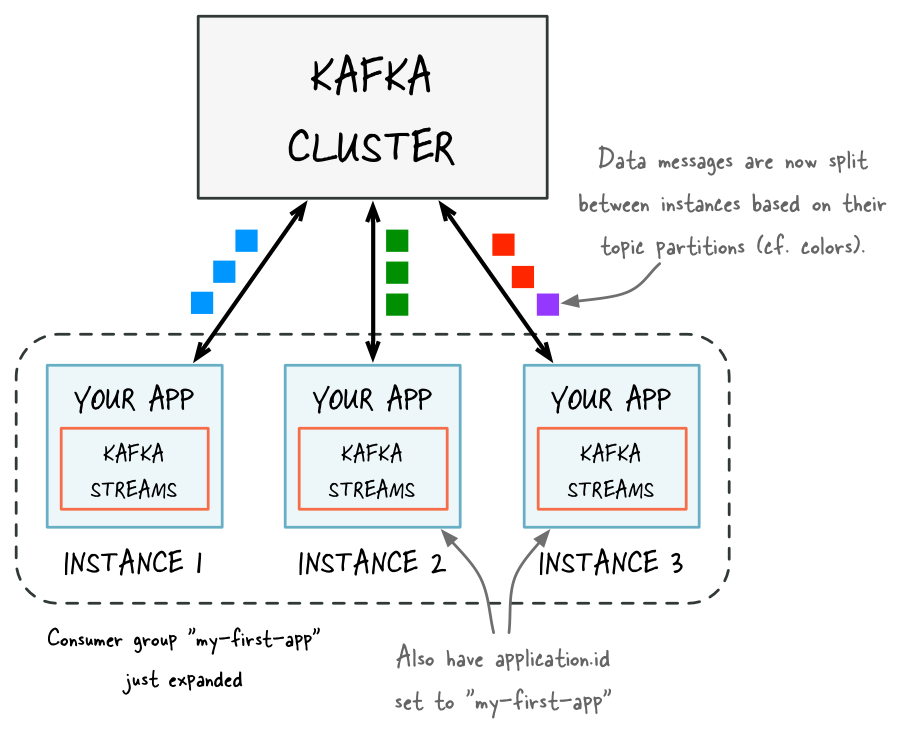
After adding capacity: now two additional instances of your Kafka Streams application are running, and they have automatically joined the application's Kafka consumer group for a total of three current members. These three instances are automatically splitting the processing work between each other. The splitting is based on the Kafka topic partitions from which data is being read.
Removing capacity from your application
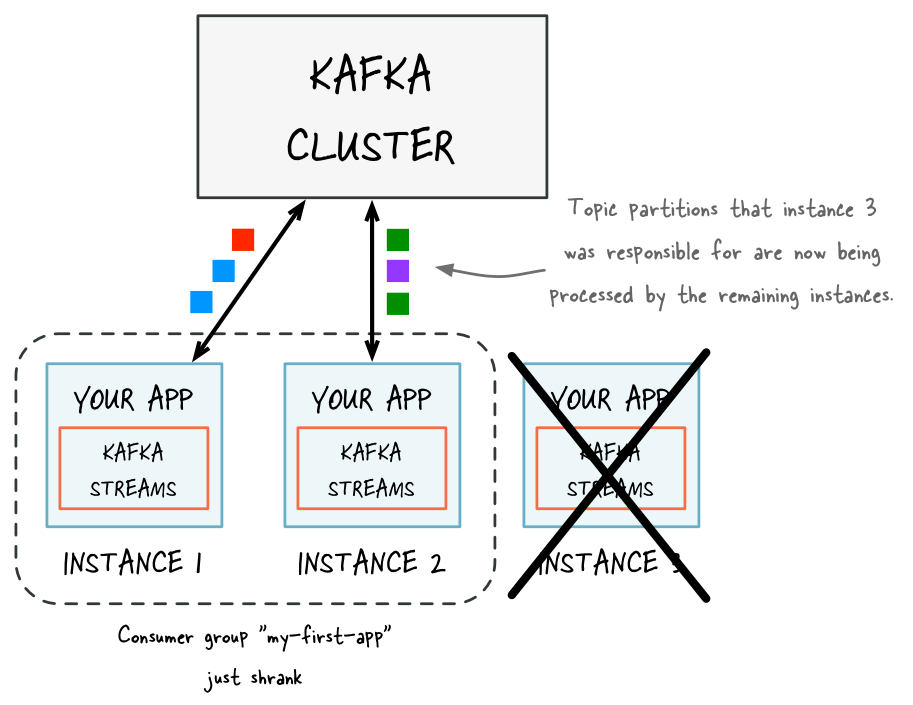
To remove processing capacity, you can stop running stream processing application instances (e.g., shut down two of the four instances), it will automatically leave the application’s consumer group, and the remaining instances of your application will automatically take over the processing work. The remaining instances take over the stream tasks that were run by the stopped instances. Moving stream tasks from one instance to another results in moving the processing work plus any internal state of these stream tasks. The state of a stream task is recreated in the target instance from its changelog topic.
State restoration during workload rebalance
When a task is migrated, the task processing state is fully restored before the application instance resumes processing. This guarantees the correct processing results. In Kafka Streams, state restoration is usually done by replaying the corresponding changelog topic to reconstruct the state store. To minimize changelog-based restoration latency by using replicated local state stores, you can specify num.standby.replicas. When a stream task is initialized or re-initialized on the application instance, its state store is restored like this:
- If no local state store exists, the changelog is replayed from the earliest to the current offset. This reconstructs the local state store to the most recent snapshot.
- If a local state store exists, the changelog is replayed from the previously checkpointed offset. The changes are applied and the state is restored to the most recent snapshot. This method takes less time because it is applying a smaller portion of the changelog.
For more information, see Standby Replicas.
As of version 2.6, Streams will now do most of a task's restoration in the background through warmup replicas. These will be assigned to instances that need to restore a lot of state for a task. A stateful active task will only be assigned to an instance once its state is within the configured acceptable.recovery.lag, if one exists. This means that most of the time, a task migration will not result in downtime for that task. It will remain active on the instance that's already caught up, while the instance that it's being migrated to works on restoring the state. Streams will regularly probe for warmup tasks that have finished restoring and transition them to active tasks when ready.
Note, the one exception to this task availability is if none of the instances have a caught up version of that task. In that case, we have no choice but to assign the active task to an instance that is not caught up and will have to block further processing on restoration of the task's state from the changelog. If high availability is important for your application, you are highly recommended to enable standbys.
Determining how many application instances to run
The parallelism of a Kafka Streams application is primarily determined by how many partitions the input topics have. For example, if your application reads from a single topic that has ten partitions, then you can run up to ten instances of your applications. You can run further instances, but these will be idle.
The number of topic partitions is the upper limit for the parallelism of your Kafka Streams application and for the number of running instances of your application.
To achieve balanced workload processing across application instances and to prevent processing hotpots, you should distribute data and processing workloads:
- Data should be equally distributed across topic partitions. For example, if two topic partitions each have 1 million messages, this is better than a single partition with 2 million messages and none in the other.
- Processing workload should be equally distributed across topic partitions. For example, if the time to process messages varies widely, then it is better to spread the processing-intensive messages across partitions rather than storing these messages within the same partition.
Handling crashes and failures
There are a few things you can do to reduce the likelihood of crashes and failures of your Kafka Streams application.
- Kafka Streams has a few configurations that can help with resilience in the face of broker failures. They can be found in the configuration guide.
- Ensure that your application is able to handle errors and failures. This includes things like configuring the correct exception handlers to handle errors such as authorization and deserialization errors, and using strategies such as dead letter queues to handle "poison pill" records.
If your Kafka Streams application does crash or fail, it will first enter the PENDING_ERROR state to gracefully close all of its existing resources, and then transition into the ERROR state. It is important to note that the PENDING_ERROR state is not recoverable, and only a restart will get the application back to the RUNNING state, thus monitoring for this state in addition to the ERROR state is important to ensure that your application is able to recover.